3D Cloud Sectional Configurator for Modular Sofas
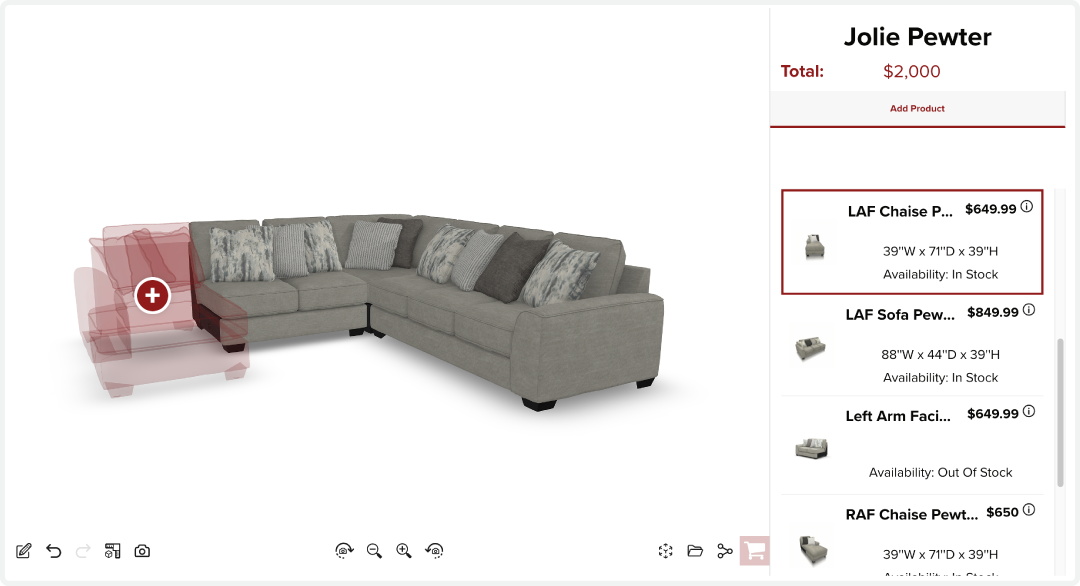
3D Cloud Sectional Configurator for Modular Sofas
Top Differentiators
Visual configure, price, and quote
Interactive 3D assembly
Add-to-cart integration
Works seamlessly with both e-commerce and in-store environments
Real-time pricing and product availability
What makes 3D Cloud Sectional Configurator unique?
The 3D Cloud Sectional Configurator allows customers to build custom sofas and sectionals through a step-by-step visual interface. Designed for online and retail settings, the tool supports complex SKU logic, automated pricing, and complete 3D visualization.
It delivers real-time updates, offers add-to-cart and quote generation workflows, and integrates WebAR OnDemand for any configuration. 3D Cloud Sectional Configurators can be deployed directly to product detail pages and reused within the 3D Cloud Room Planner.
Fast Facts
Designed for modular furniture with unlimited layout combinations
Offers drag-and-drop functionality in an interactive 3D space
Displays real-time pricing with embedded business logic
Built for omnichannel applications
Integrates with cart and quote tools
Compatible with large product catalogs
Outcomes
30% increase in average order value (AOV)
18–35% add-to-cart rate
1–2% view-to-purchase rate
How is 3D Cloud Sectional Configurator different?
Engineered for large catalogs of modular furniture
Optimized for sectional-specific flow and layout logic
Fully visual, drag-and-drop interface
Provides real-time product validation and dynamic pricing
Integrates seamlessly with both e-commerce and point-of-sale systems
Is it secure?
Yes. 3D Cloud applications are hosted in a secure, cloud-based infrastructure featuring layered security architecture, redundancy, and 24/7 monitoring. Regular penetration and vulnerability testing is conducted, and the system complies with SOC 2 Type I & II and ISO 27001/2013 certifications.
Will it work with our other systems?
Yes. The configurator integrates with core systems including add-to-cart functionality, product information management (PIM), customer relationship management (CRM), and analytics platforms.
Exclusive Features
Analytics Dashboards - Track sessions, users, projects, conversion rates and other KPIs
SIF File Standards Support - Import and sync to SIF files and generate SIF order files
Inspiration Rooms - Browse inspiration rooms that auto-generate complete designs for a quick starting point.
Standard Features
Full Keyboard Navigation - Place, move, rotate, and select products entirely with keyboard — no mouse required.
Data Driven Product Attachement - Data defined rules for how products can attach to each other to create modular designs, ie custom sectional sofas
Drag and Drop Placement - Place products with drag-and-drop or shortcut keys. Smart snapping and alignment ensures perfect alignment.
Product Compatibility Checker - Visually greys out products in the search and browse panel that have no valid placement location in the current scene.
Product Customization - Style individual or all products with data-driven options — colors, materials, finishes, and hardware. Zoom To Product during Customization (optional); Pivot position overrides per step or option (10.2.0)
Add-to-Cart - Support for add-to-cart integrations with eComm website or point of sale systems.
CMS/DAM/PIM Integration - Integrate with your content management, digitial asset, and product management systems.
CRM Integration - Connect to your CRM system to capture leads and manage customer relationships.
Custom Branding - White-label the platform to seamlessly match your website and brand identity.
Pricing and Inventory - Live and scheduled pricing and inventory data integrations to keep catalogs current.
Configurable Round of Dimension Labels - Control whether dimensions display as fractions or decimals. This allows clients to match their preferred units and precision standards for dimension display.
Multi-select - Select multiple products at once for bulk editing.
Product Dimensions - View product dimensions. Support for cabinet molding dimensions; support for worktop/countertop dimensions
PDF Export - Export your Bill of Materials and design images as a polished PDF document.
Real-time pricing - See live project cost estimates as you design, with support for live pricing and inventory data.
Screenshot Download - Save a screenshot of the current camera view
Search & Browse - Search and browse extensive product catalogs across furniture, cabinets, decking, and more. Global or category search; supports nested category trees
Support for GLB file format (Android) - Our platform supports the creation and delivery of GLB assets for products to support AR viewing on Android devices
Support for USDz file format (iOS) - Our platform supports the creation and delivery of USDz assets for products to support AR viewing on iOS devices
3D Camera - Design in 3D with a single screen. Camera presets (optional)
Animations - Animate the camera or products in the scene triggered by user interactions with the application
Quick-View Hotkeys - Instantly switch between elevations, 2D, 3D, and product list views using keyboard shortcuts.
View in Room Support - Users can see the product or design in their space on a mobile device that supports AR viewing (iOS or Android)
Who is using 3D Cloud Sectional Configurator?
CITY Furniture
Joybird
Raymour & Flanigan
HOM
AFW
La-Z-Boy
DFS
For offline reading or sharing, access the full article as a PDF: Download here.