3D Cloud Room Planner for Designers
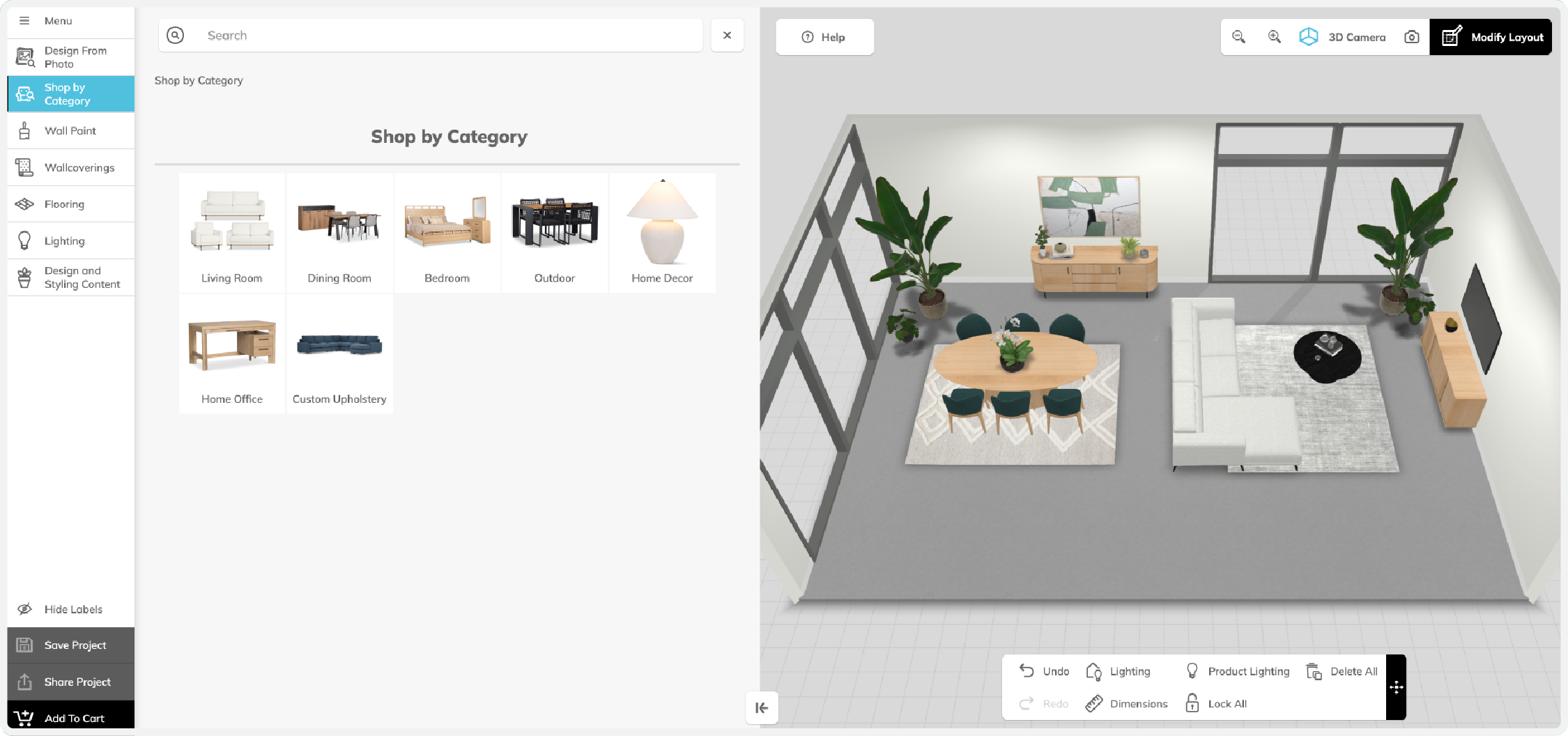
3D Cloud Room Planner for Designers view of a designed room in 3D
Top Differentiators
Enterprise-grade user experience
Handles complex SKUs and pricing logic
Interface for professional designers
Integrated add-to-quote and design tools
3D plan and design functionality in a unified view
Lightning-fast 4K renders
What makes 3D Cloud Room Planner for Designers unique?
This specialized version of the 3D Cloud Room Planner is tailored for professional designers, sales teams, and enterprise use cases. It supports advanced workflows including space planning, project estimating, 4K rendering, and product customization—streamlining multiple functions into a single, efficient tool.
With built-in business rules, quoting integrations, and design support features, this tool allows designers to deliver accurate, high-quality outputs with speed. It’s ideal for managing complex layouts and delivering visual plans that are precise and persuasive.
Fast Facts
Built to handle complex product structures and pricing logic
Enables multi-room layout planning
Delivers high-quality, real-time visuals, including 4K renders
Includes annotation and export capabilities
Integrates with CRM, PIM, cart, and quote systems
Outputs project-ready renders, floor plans, and related documentation
Outcomes
8 projects per month per designer on avg
26-minute avg session duration
$4k avg order value
How is 3D Cloud Room Planner for Designers different?
Purpose-built for designers and sales teams
Supports high-SKU logic and configuration rules
Prioritizes project-oriented design workflows
Includes CRM and quoting integrations
Provides precision tools for designing and delivering polished outputs
Is it secure?
Yes. All 3D Cloud applications operate in a secure, cloud-hosted environment with layered architecture, redundancy, and continuous 24/7 monitoring. Routine penetration and vulnerability testing is conducted. The platform is fully compliant with SOC 2 Type I & II and ISO 27001/2013 standards.
Will it work with our other systems?
Yes. The 3D Cloud Room Planner for Designers integrates with common systems including add-to-cart features, PIM databases, CRM platforms, and analytics. It also supports SIF file integration, making it well-suited for contract furniture use cases.
Exclusive Features
Design from Photo - Design and styling applied to your project based on curated photos.
Analytics Dashboards - Track sessions, users, projects, conversion rates, and other KPIs.
Furniture and Decor - Thousands of non-buyable 3D models to personalize your scene — furniture, décor, plants, and more.
Inspiration Rooms - Browse inspiration rooms that auto-generate complete designs for a quick starting point.
Room Scan Feature (iOS) - Scan a room to auto-generate a floor plan and upload it to the planner instantly.
Standard Features
ADA-compliant Controls - Accessible drag handles and interaction patterns for assistive technology users.
Full Keyboard Navigation - Place, move, rotate, and select products entirely with keyboard — no mouse required.
Get Help Button - Customizable help button on startup, journey, and main menu screens.
Custom Image Upload - Upload any photo to create custom wall textures, floor coverings, or murals.
Data Driven Product Attachment - Data-defined rules for how products can attach to each other to create modular designs, e.g., custom sectional sofas.
Drag and Drop Placement - Place products with drag-and-drop or shortcut keys. Smart snapping and alignment ensure perfect alignment.
Room Styling - Customize room wall colors, flooring, wall tiles, and molding. Custom paint colors supported (Hex / RGB).
Add-to-Cart - Support for add-to-cart integrations with eComm websites or point-of-sale systems.
CMS/DAM/PIM Integration - Integrate with your content management, digital asset, and product management systems.
CRM Integration - Connect to your CRM system to capture leads and manage customer relationships.
Custom Branding - White-label the platform to seamlessly match your website and brand identity.
Pricing and Inventory - Live and scheduled pricing and inventory data integrations to keep catalogs current.
SSO and Authorization - Support for single sign-on user login and permissions for enterprise security.
Clash and Fix Alerts - Support for clash (yellow) or fix (red) alerts based on standard or custom rules, such as preventing product overlap.
Grouping - Group products and create favorite groups.
Move Products by Distance - Move products by a specified distance along a line for exact placement.
Multi-select - Select multiple products at once for bulk editing.
Product Dimensions - View product dimensions, including cabinet molding and worktop/countertop dimensions.
Product Measurements - View and create product-to-product dimensions.
Room Dimensions & Measurements - View and create room or space dimensions.
Bill of Materials - Auto-generated BOM with dimensional drawings and cut lists. Editable quantities and off-scene items.
Design Packet Export - Complete project package with elevations, product lists, and renders. Customizable templates (Private Beta; not supported in Safari).
HD Rendered Screenshots - Generate high-quality images (2K in seconds, 4K/8K in minutes) with customizable backgrounds, lighting, and visibility controls.
Panographic Render - View your entire room in a panoramic render compatible with browsers and VR headsets.
PDF Export - Export your Bill of Materials and design images as a polished PDF document.
Real-time pricing - See live project cost estimates while designing, with live pricing and inventory support.
Screenshot Download - Save a screenshot of the current camera view.
Screenshot Editor - Fine-tune HD rendered screenshots with post-render editing controls.
Screenshot Gallery - Save and organize screenshots and renders in a built-in gallery.
Search & Browse - Search and browse extensive product catalogs with global/category search and nested category trees.
Support for GLB file format (Android) - Supports GLB assets for AR viewing on Android devices.
Support for USDz file format (iOS) - Supports USDz assets for AR viewing on iOS devices.
Mobile Web View - Enable customers to view projects, BOMs, and collaborate with designers on mobile.
Project Sharing - Save, share, and collaborate on projects. Designers can view preferences and edit projects.
Projects Management - Search, filter, and view projects with version history.
Read-Only Sharing - Share in a read-only format to preserve design integrity.
Custom Ceilings - Support complex ceiling types including vaulted, angled, cathedral, and custom, with skylights and dormers.
Floor Plan Drawing - Draw floor plans or use predefined shapes. Add doors, windows, and openings, including customizable doors and bathroom wet zones.
Floor Plan Trace - Trace existing floor plans and add structural elements.
Room Templates - Choose from 10 pre-built room templates to jumpstart your design.
Smart Wall Drawing - Auto-snapping angles, real-time measurements, and efficient room enclosure tools.
2D Camera - View and design in a top-down 2D view.
3D Camera - Design in 3D with optional camera presets.
Elevation Views - Overhead and elevation drawings with room, architectural, and product dimensions.
Lighting Controls - Adjust room lighting, sun position, and time of day, with support for custom and automatic lighting.
Quick-View Hotkeys - Instantly switch between elevations, 2D, 3D, and product list views using keyboard shortcuts.
Render Style Options - Toggle real-time visual styles like wireframe, white fill, and color fill.
View in Room Support - View products or designs in real space using AR on supported mobile devices.
Who is using 3D Cloud Room Planner for Designers?
La-Z-Boy
Frontgate
Ballard Designs
Design Within Reach
John Lewis & Partners
CITY Furniture
For offline reading or sharing, access the full article as a PDF: Download here.